But the smartest brands in 2026 have cracked a smarter approach. That approach is a well-built content repurposing strategy. The process of taking one piece of high-quality content and transforming it into multiple formats for multiple platforms. A strong content repurposing strategy means one well-researched blog post can feed your entire content calendar — from Instagram Reels to LinkedIn carousels to email newsletters — all without starting from scratch.
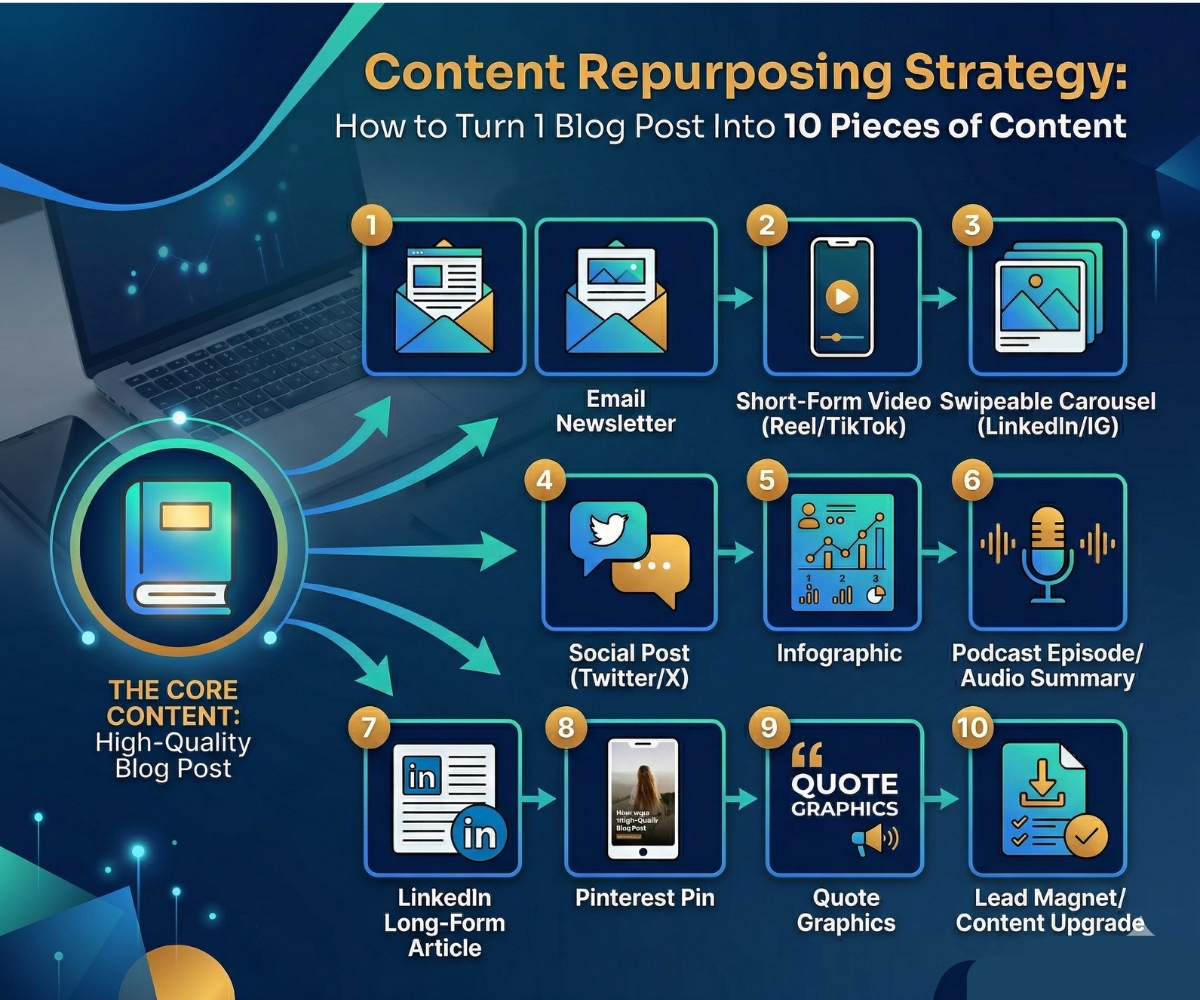
In this guide, we’ll walk you through a step-by-step content repurposing strategy that turns one blog post into 10 distinct pieces of content. Let’s get into it.
| 💡 Key Stat | A consistent content repurposing strategy can increase your content output by up to 6x while reducing creation time by nearly 60%. More reach, less effort. |
Why Every Marketer Needs a Content Repurposing Strategy
Before we dive into the how, let’s cover the why — because understanding the logic will make you a far more effective repurposer.
1. Different audiences consume content differently
Some people read long-form blogs. Others scroll Instagram. Many prefer podcasts during their commute. A content repurposing strategy lets your message reach people where they already are, in the format they prefer.
2. Repetition builds brand authority
Marketing research consistently shows that people need multiple exposures to a message before it sticks. According to HubSpot’s Content Marketing Report, brands that publish consistently across formats see significantly higher audience recall and trust over time.
3. A Content Repurposing Strategy Multiplies Your SEO Power
When your blog post becomes a YouTube video, a LinkedIn article, and a podcast — each linking back to the original — you’re building topical authority that search engines reward. Google’s Search Central documentation confirms that consistent, multi-format coverage of a topic is one of the clearest signals of genuine expertise.
4. It protects your team from content burnout
Creating net-new content every day is unsustainable. A smart content repurposing strategy gives your team breathing room while keeping your publishing cadence high and your audience engaged.
Step 0: Choose the Right Post for Your Content Repurposing Strategy
Not every blog post is equally repurpose-worthy. Before you start, pick a post that checks most of these boxes:
- It’s evergreen (relevant beyond a news cycle)
- It performed well — strong traffic, shares, or comments
- It covers a meaty topic with multiple angles or takeaways
- It contains data, examples, or step-by-step advice
- It aligns with a product, service, or goal you’re actively promoting
Not sure where to start? Check out our guide on how to write a high-performing blog post — it covers exactly what makes a post worth building a content repurposing strategy around.
Once you’ve chosen your post, read it again with fresh eyes. Highlight the core argument, the key stats, and the most actionable tips. These become the raw material for everything that follows.
The 10-Step Content Repurposing Strategy (Platform by Platform)
Here’s the full content repurposing strategy broken down into 10 actionable formats. Each one maps to a different platform and a different audience behaviour.
| 01 | Short-Form Video (Reels / TikTok / YouTube Shorts)
Turn your post’s #1 tip or most surprising stat into a punchy 30–60 second video. |
Start by identifying a standalone insight from your post:
- Pick one insight from the post that can stand alone (no context required).
- Write a 3-part script: Hook (0–5s) → Value (5–45s) → CTA (45–60s).
- Record yourself speaking to camera, or use screen-recorded slides with a voiceover.
- Add captions — 80% of social video is watched on mute.
- End with: “Full breakdown in the link in bio” to drive traffic back to the blog.
| 🎯 Pro Tip | You don’t need a professional studio. A smartphone + good lighting is enough. Learn more about video production for beginners at TikTok’s Creator Academy. |
| 02 | Carousel Post (LinkedIn / Instagram)
Transform your step-by-step structure into a swipeable slide deck. |
You can transform your step-by-step structure into a swipeable slide deck:
- Slide 1: A bold, curiosity-driven headline (mirror the blog title or rework it as a question).
- Slides 2–8: One key point per slide. Use the blog’s headings as your slide titles.
- Keep each slide to one idea and max 30 words of copy.
- Slide 9–10: Summary + CTA directing people to the full post.
- Design in Canva using your brand colours. Export as a PDF for LinkedIn or images for Instagram.
| 🎯 Pro Tip | LinkedIn carousels (uploaded as PDFs) consistently outperform single image posts. This format alone can 3x your organic reach on the platform. |
| 03 | Email Newsletter
Package the blog’s core value into a scannable email your subscribers will actually read. |
Draft a concise introduction of two to three sentences:
- Write a short intro (2–3 sentences) that teases the value without giving everything away.
- Pull 3–5 key takeaways from the post and format them as brief bullets.
- Include one direct quote or surprising stat from the article.
- Add a single, clear CTA button: “Read the Full Guide →”.
- Keep the email under 300 words — your goal is to warm them up and get the click.
| 🎯 Pro Tip | For email best practices and benchmarks by industry, Mailchimp’s Email Marketing Benchmarks is a great reference. Also see our own guide on Email Marketing in 2026: The Complete Guide to Future Trends. |
| 04 | Twitter/X Thread
Break the blog into a numbered thread that builds suspense and drives engagement. |
Begin your thread with a “hook”—the most bold or counterintuitive claim:
- Tweet 1: The hook — lead with the most counterintuitive or bold claim in your post.
- Tweets 2–9: One idea per tweet, expanding naturally from your blog’s structure.
- Use line breaks liberally — dense tweets get skipped.
- Add relevant numbers and data points. Specificity performs better than generality.
- Final tweet: “Found this useful? The full post (with examples) is here:” + link.
| 🎯 Pro Tip | Schedule your thread for 8–9am or 5–6pm in your target timezone. Replies and retweets in the first 30 minutes determine how widely it spreads. |
| 05 | Infographic
Turn complex information or a multi-step process into a visual that people save and share. |
Pinpoint the most visual element of your content:
- Identify the most visual element of the post — a process, a comparison, a list of stats.
- Sketch a rough layout: top → headline, middle → the content, bottom → your logo/URL.
- Use Canva, Piktochart, or Adobe Express with a consistent colour palette.
- Keep text minimal — the design should do most of the work.
- Post natively to Pinterest and Instagram, and embed it in the original blog post to boost dwell time.
| 🎯 Pro Tip | Infographics embedded in blog posts improve on-page time by an average of 2 minutes — a significant positive signal for SEO. |
| 06 | Podcast Episode or Audio Summary
Record a conversational take on the blog’s topic — no fancy setup required. |
Use the blog as a conversational guide rather than a script:
- Use the blog as a loose script, but speak conversationally — don’t read it word for word.
- Add a personal anecdote or a recent example that wasn’t in the original post.
- Aim for 8–15 minutes for a solo episode, or invite a guest to debate the post’s core argument.
- Upload to Spotify for Podcasters (free), Apple Podcasts, and Buzzsprout.
- Embed the player directly in the blog post — it’s a powerful engagement signal.
| 🎯 Pro Tip | Looking to launch a podcast as part of your content repurposing strategy? Read our full guide: Podcast Marketing Strategy: How to Start a Podcast That Grows Your Brand. |
| 07 | LinkedIn Long-Form Article
Rewrite the blog post with a professional, B2B angle for LinkedIn’s native publishing platform. |
Reframe your content for a professional audience:
- Don’t copy-paste the blog. Reframe it for a professional audience — lead with a business problem or industry insight.
- Open with a personal anecdote or a bold opinion to hook the reader immediately.
- Restructure for LinkedIn: shorter paragraphs, more subheadings, bold key phrases.
- Remove overt sales CTAs — LinkedIn readers are allergic to hard selling.
- End with an open question to your network to spark comments and discussion.
| 🎯 Pro Tip | LinkedIn articles get indexed by Google. Use your target keyword naturally in the title and first paragraph to pick up additional organic search traffic. |
| 08 | Pinterest Pin (Static + Idea Pin)
Create visually optimised pins to drive long-tail traffic from Pinterest’s search engine. |
How to execute this part of your content repurposing strategy:
- Create a vertical image (2:3 ratio, 1000x1500px) featuring a clean headline and a bold visual.
- Use your brand colours and include your website URL at the bottom.
- Write a keyword-rich pin description (150–300 words) — Pinterest is a visual search engine.
- Create 3–5 different pin designs for the same blog post to test which performs best.
- Link every pin directly to the blog post URL.
| 🎯 Pro Tip | Unlike Instagram, Pinterest pins have a long shelf life. A great pin can drive traffic for months or even years — making it one of the highest-ROI channels in your content repurposing strategy. |
| 09 | Quote Graphics for Instagram / Facebook Stories
Pull 3–5 punchy lines from the blog and turn each into a standalone shareable graphic. |
How to execute this part of your content repurposing strategy:
- Scan the blog for your sharpest one-liners, bold claims, or memorable stats.
- Design each quote on a 1080x1080px (square) or 1080x1920px (Stories) canvas in Canva.
- Keep it simple: quote in large text, your logo in the corner, your brand colours.
- Add a CTA in the caption: “For the full breakdown, link in bio.”
- Schedule 5–7 of these to drip out over the following 2–3 weeks — not all at once.
| 🎯 Pro Tip | Quote graphics are among the most-saved content types on Instagram. For social media strategy tips that complement this content repurposing strategy, see our guide on 10 Proven Social Media Marketing Strategies That Drive Real Sales. |
| 10 | Lead Magnet or Content Upgrade
Turn the blog post into a downloadable PDF, checklist, or template that grows your email list. |
Execute this part of your content repurposing strategy:
- Identify the most actionable part of the post — a checklist, a framework, a step-by-step process.
- Expand it slightly with bonus tips or a worksheet version, then design it in Canva or Google Docs.
- Export as a PDF and gate it behind a simple email opt-in form (Mailchimp, ConvertKit, etc.).
- Embed the opt-in form directly within the original blog post, midway through or at the end.
- Mention the free download in your social posts to drive both traffic and subscribers simultaneously.
| 🎯 Pro Tip | Want to build your list faster? Our guide on How to Build an Email List in 2026 — 9 Proven Organic Strategies pairs perfectly with this step of your content repurposing strategy. |
Putting It All Together: Your 30-Day Content Repurposing Strategy Calendar
Here’s a simple schedule for rolling out all 10 content pieces from a single blog post over 30 days:
| Week | Publish | Goal |
| Week 1 | Blog Post + Email Newsletter + Short-Form Video | Launch core content, warm up existing audience |
| Week 2 | LinkedIn Carousel + Twitter Thread + LinkedIn Article | Expand reach into professional networks |
| Week 3 | Infographic + Quote Graphics (drip 5–7 across the week) | Visual push for saves and shares |
| Week 4 | Podcast Episode + Pinterest Pins + Lead Magnet | Long-tail SEO and email list growth |
Best Tools to Execute Your Content Repurposing Strategy Faster
You don’t need an expensive tech stack. Here are the most practical tools for each part of your content repurposing strategy:
Canva — Carousels, infographics, quote graphics, Pinterest pins, lead magnets. canva.com
CapCut / DaVinci Resolve — Short-form video editing with auto-captions. capcut.com
Descript — Record, edit, and repurpose audio/video content with AI. descript.com
Buffer or Later — Schedule and distribute content across all platforms from one dashboard. buffer.com
Mailchimp or ConvertKit — Email newsletters and lead magnet delivery. mailchimp.com
Buzzsprout — Podcast hosting with built-in distribution to major platforms. buzzsprout.com
Notion — Manage your content repurposing strategy workflow and publishing calendar. notion.so
Common Content Repurposing Strategy Mistakes to Avoid
A content repurposing strategy is powerful, but doing it wrong wastes time. Watch out for these pitfalls:
Copying and pasting without adapting: Every platform has its own culture and algorithm. A blog post pasted verbatim into a LinkedIn post will underperform every time. Always reformat and reframe for the destination platform.
Trying to do all 10 at once: If you’re just starting out with your content repurposing strategy, pick 3–4 formats that match your current strengths. Master those before expanding.
Skipping the call to action: Each piece of repurposed content should have a clear next step — usually driving people back to the original blog or to an email opt-in. Don’t leave the journey incomplete.
Using only top-performing posts: A content repurposing strategy is also a great way to resurrect older, underperforming posts with strong ideas that never got traction. A new format can give old content a second life.
Final Thoughts: Build a Content Repurposing Strategy That Scales
The most successful content marketers in 2026 aren’t necessarily the most prolific — they’re the most strategic. They understand that a single great idea, packaged in 10 different formats and distributed across 10 different touchpoints, will always outperform 10 mediocre ideas published once and forgotten.
Start with your best blog post. Run it through the 10-step content repurposing strategy above. Publish consistently over 30 days. Then measure what worked, double down, and repeat.
Want to go deeper on digital marketing strategy? Explore our Content Marketing Blog or check out our latest post on Generative Engine Optimization (GEO): The New SEO to stay ahead in 2026.
| 🚀 Action Step | Pick one blog post from your archive right now. Identify which 3 of the 10 formats feel most achievable for your team this week. Start there — your content repurposing strategy will build momentum from that first step. |
In 2026, mastering a content repurposing strategy is essential for maximizing reach without burnout. NIDM (National Institute of Digital Marketing) provides the hands-on training to help you transform one blog post into ten high-impact assets like Reels, carousels, and emails. Read our latest guide on Content Repurposing Strategy to start working smarter and scaling your digital presence today.