Managing campaigns in Google Ads often involves repetitive tasks that can consume hours each week. From monitoring performance and adjusting bids to reviewing search terms and generating reports, efficiency matters just as much as strategy. By using the right shortcuts, PPC managers can save time, improve workflows, and support stronger campaign performance. To build on these practical skills, many professionals also choose a digital marketing course to deepen their knowledge of campaign strategy, automation, analytics, and advanced optimization techniques. Combining hands-on shortcuts with structured training can help PPC managers work more efficiently while improving long-term results.
Why Google Ads Shortcuts Matter for PPC Managers
Shortcuts help reduce manual effort, minimize repetitive tasks, and improve account management speed. Instead of spending time on navigation or routine changes, PPC managers can focus more on strategy and optimization. For anyone managing multiple campaigns or large accounts, improving Google Ads productivity through shortcuts can have a significant impact. Pairing these efficiency tactics with a digital marketing course can provide additional expertise in areas like bidding strategies, keyword research, and performance analysis, helping PPC managers strengthen both execution and overall campaign management.
1.Use Keyboard Shortcuts to Navigate Faster
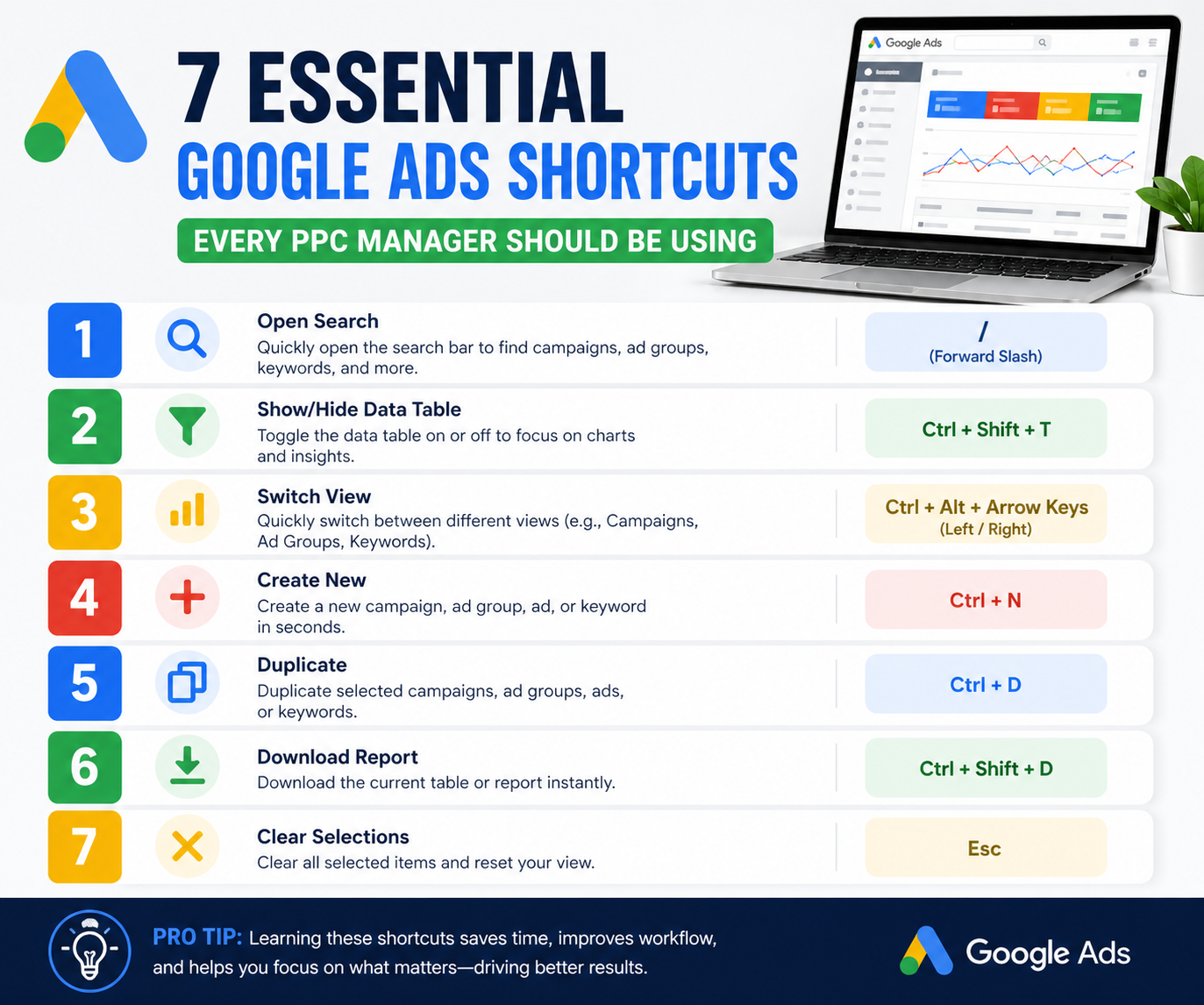
Built-in keyboard shortcuts can significantly speed up how PPC managers move through Google Ads. Instead of relying on multiple clicks to switch between campaigns, ad groups, keyword reports, and search terms, shortcuts allow faster access to the areas you use most. This becomes especially useful when managing several accounts or conducting routine optimization tasks throughout the day.
Many PPC managers underestimate how much time is lost through repeated navigation. Even saving a few seconds per action can add up to hours over the course of a week. By using shortcuts to access performance reports, campaign settings, and keyword management areas, advertisers can streamline their workflow and improve focus. This is one of the simplest ways to increase Google Ads productivity without changing your broader strategy.
Benefits of Faster Navigation
Faster navigation reduces administrative friction, improves workflow efficiency, and allows PPC managers to spend more time on analysis and decision-making rather than moving through the platform.
2.Duplicate Campaigns and Ad Groups Instead of Rebuilding
Duplicating campaigns and ad groups is one of the most practical shortcuts for saving time in campaign management. Rather than rebuilding targeting settings, ad copy structures, extensions, and bidding strategies from scratch, PPC managers can use proven campaign structures as templates for expansion.
This shortcut is particularly valuable when launching campaigns in new markets, testing audience segments, or scaling successful campaigns. It helps preserve consistency while reducing setup time. It also lowers the risk of errors that can occur when recreating campaign structures manually. As a result, duplication becomes not just a time-saving shortcut, but also a quality-control measure.
When Duplication Saves Time
Use duplication when expanding campaigns geographically, testing new messaging variations, or replicating high-performing structures across similar products or services.
3. Use Google Ads Editor for Bulk Changes
Google Ads Editor is one of the most powerful productivity tools available to PPC managers. For advertisers handling large accounts, making changes one by one inside the platform can be extremely inefficient. Bulk editing provides a much faster alternative.
With Google Ads Editor, you can adjust bids, pause or enable keywords, edit ad copy, and apply account-wide changes in far less time. It also supports offline work, which can improve efficiency during large restructuring projects. For agencies or in-house teams managing multiple accounts, this shortcut can save substantial time while improving overall Google Ads productivity.
Tasks You Can Speed Up with Bulk Editing
Bulk edits are especially useful for updating bids, making large-scale ad copy changes, applying naming convention updates, and managing keyword-level optimizations at scale.
4.Apply Filters to Find Optimization Opportunities Faster
Filters act as a shortcut for analysis by helping PPC managers identify performance issues without manually reviewing every campaign or keyword. Instead of scanning large datasets line by line, filters help surface areas that need immediate attention.
This makes optimization much more efficient. Whether you’re looking for high-spend keywords without conversions, ads with low click-through rates, or campaigns exceeding CPA targets, filters help prioritize actions faster. Saved filters can also improve consistency by making recurring account audits easier.
Filter Ideas for Better Optimization
Use filters to identify underperforming keywords, low Quality Score terms, high-cost search queries, or campaigns missing target performance benchmarks to support better Google Ads optimization.
5.Use Automation for Repetitive Tasks
Automation is one of the most effective shortcuts for reducing manual work inside Google Ads. Many routine tasks do not need to be managed manually every day. Automated rules can handle them for you based on performance conditions you define.
For example, PPC managers can automate bid adjustments, budget increases, ad scheduling changes, or keyword pauses when certain thresholds are met. This helps improve consistency, reduce oversight risks, and free up time for more strategic work. As accounts scale, automation becomes increasingly important for efficiency.
Tasks Worth Automating
Consider automating repetitive tasks such as pausing low-performing keywords, adjusting bids based on conversion data, or increasing budgets for campaigns hitting performance targets.
6. Use Search Term Reports to Add Negative Keywords Faster
Search term reviews are critical for improving targeting, but they can become time-consuming without shortcuts. Using quick access methods and bulk negative keyword additions helps make this process much faster.
By regularly reviewing search terms and acting quickly on irrelevant queries, PPC managers can reduce wasted spend, improve traffic quality, and strengthen campaign efficiency. This remains one of the fastest ways to improve Google Ads optimization, especially for search campaigns with broad or phrase match targeting.
Why This Shortcut Matters
Adding negative keywords faster improves relevance, reduces budget waste, and helps direct spend toward higher-intent searches that are more likely to convert.
7. Save Custom Reports and Columns
Reporting can take up a large share of a PPC manager’s time, especially when rebuilding the same views repeatedly. Saving custom columns and reusable reports is a simple shortcut that improves efficiency and creates more consistent analysis.
Custom views allow you to monitor the metrics that matter most without manually adjusting reporting layouts every time. This makes weekly performance reviews faster and helps ensure important data points are always visible. Over time, this shortcut improves both reporting efficiency and optimization decision-making.