The Gmail AI update is not a minor tweak. In January 2026, Google rolled out Gemini 3 across Gmail’s 3 billion+ users, introducing AI-powered email summaries, a smart inbox that filters by relevance, and tools that let subscribers query their inbox like a search engine. If you are an email marketer and you have not adjusted your strategy yet, your campaigns are already working against you. This guide breaks down exactly what changed, why it matters, and the specific steps you need to take today.
What Is the Gmail AI Update?
The Gmail AI update refers to Google’s full integration of its Gemini 3 AI model into Gmail, announced in January 2026. It is not a single feature — it is an entire reimagining of how the inbox works.
Here is what rolled out:
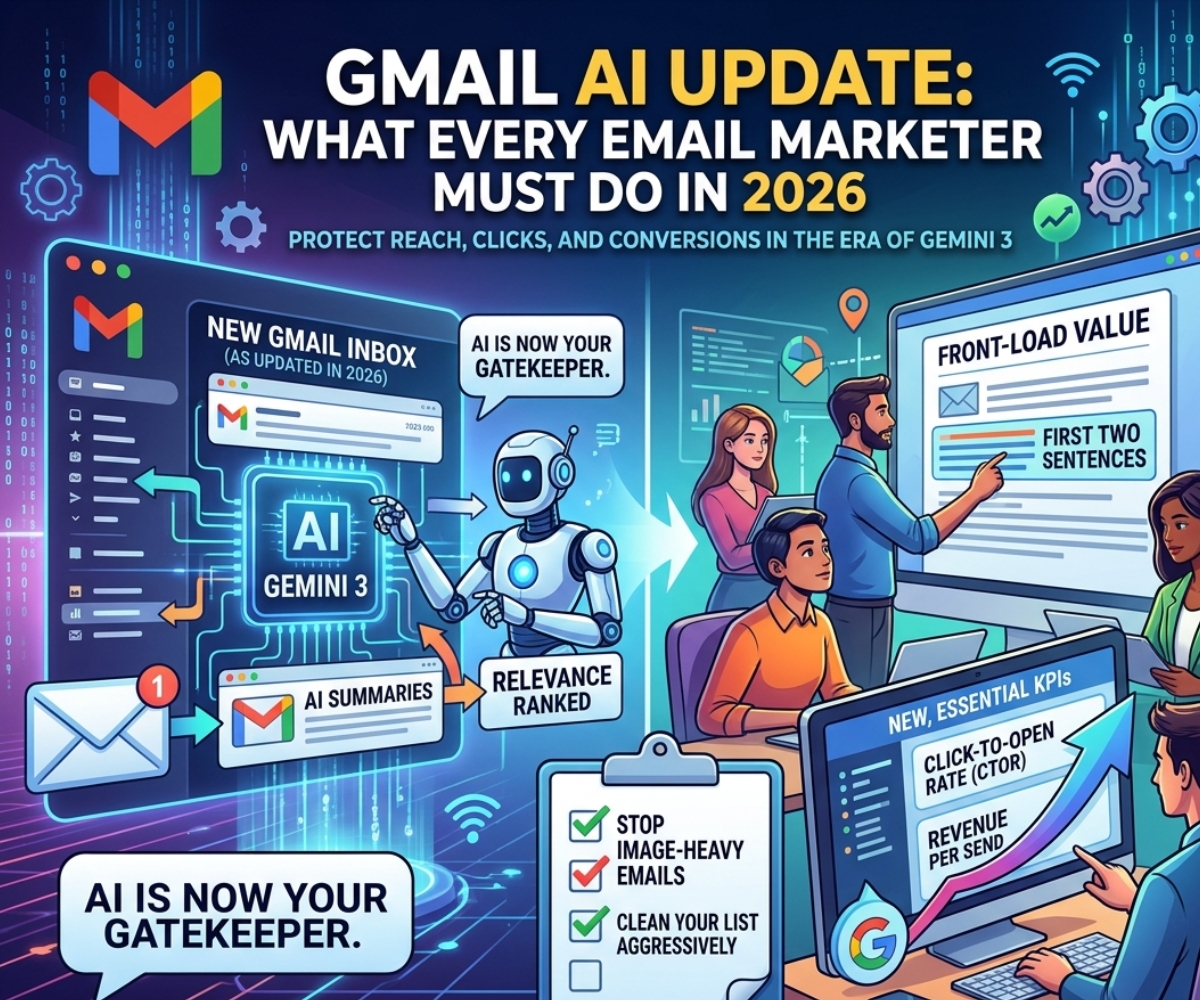
- AI Overviews (Thread Summaries): When a subscriber opens an email or email thread, Gemini automatically generates a 1–3 sentence summary. The user reads the AI version first, before your content.
- AI Inbox: A new inbox view that filters and ranks emails by relevance rather than by arrival time. Currently in testing with trusted users in the US, with broader rollout expected throughout 2026.
- Natural Language Search: Subscribers can now ask their inbox questions like “What discount codes do I have active?” or “Did my order ship?” — and Gemini surfaces answers by scanning multiple emails at once, without the user opening a single one.
- Suggested Replies and Help Me Write: AI tools that help users respond faster, reducing the time they spend actually reading your email.
- Promotions Tab Sorted by Relevance: Gmail already updated the Promotions tab in the app to sort by relevance, not chronology. Chronological order can still be toggled for now — but that may not last long.
The result is an inbox where your email is no longer the first thing a subscriber experiences. An AI is.
Why the Gmail AI Update Changes Everything for Marketers
Your Metrics Are Already Being Distorted
The numbers you track every week are shifting under your feet. Here is what the data shows since the Gmail AI update rolled out:
- Open rates have gone up — but not because more humans are reading your emails. Gmail auto-opens messages to generate AI summaries. Some platforms record these as human opens. The number is now partly meaningless.
- Click-through rates have dropped — from an average of 4.35% to 3.93% since AI summaries launched. The cause is clear: subscribers extract the key information from the AI snippet and never click through to the full email.
- Up to 40% of emails reaching Gmail inboxes may be deprioritized by AI filtering, according to deliverability research from Folderly — meaning your email technically “delivered” but is effectively invisible.
The old benchmarks no longer apply. Any email strategy still being judged on raw open rate is measuring the wrong thing.
Your Email Now Has an AI Gatekeeper
Before any human reads your campaign, Gemini is reading it first. It decides how to summarize it, whether it is worth surfacing prominently, and whether it qualifies for the AI Inbox. Gmail’s relevance ranking likely takes into account:
- Depth and recency of subscriber engagement with your brand
- Sender reputation and authentication compliance
- Structural clarity and value density of your email content
- Whether your email uses live text or buries content in images
This is the most significant shift in inbox dynamics since Gmail introduced tabs in 2013. The inbox has gone from passive storage to active gatekeeper.
What the Gmail AI Update Means for Your Campaigns
AI Summaries Can Bury Your CTA
If your call to action sits halfway down the email, Gemini may not surface it in the summary. If your value proposition is buried after a long preamble, the AI will skip it. The subscriber sees a summary that does not mention your offer — and moves on.
This matters most for:
- Promotional emails with discount codes or limited-time offers
- Product launches where the key benefit is explained midway through
- Re-engagement emails where the incentive appears at the end
The fix is simple in principle, harder in practice: lead with the point.
The “One Big Image” Email Is Dead
If your email is mostly a designed image — a banner with text baked into it — Gemini cannot scan or summarize it. An email Gemini cannot read is an email Gemini cannot prioritize. The era of image-heavy email templates built for visual appeal alone is over. Every email needs live, readable text that an AI can parse.
Relevance Now Outranks Timing
For years, send-time optimization was treated as a significant lever for email performance. The Gmail AI update changes the equation. Relevance — earned through genuine engagement over time, accurate segmentation, and content that actually matches subscriber intent — now matters more than what time you hit send. An irrelevant email sent at the “perfect time” will be deprioritized by the AI regardless.
Inactive Lists Will Hurt You Faster
Gmail’s AI learns from individual subscriber engagement history. If a contact has not opened, clicked, or interacted with your emails in months, the AI has already learned this — and will rank your emails lower for that person. Inactive subscribers do not just drag down your metrics. They now actively train Gmail’s algorithm to suppress your reach.
7 Things Every Email Marketer Must Do After the Gmail AI Update
1. Front-Load Your Value in the First Two Sentences
Gemini reads from the top. The first 100–200 characters of your email body are what shapes the AI summary. Replace “Hi [First Name], hope you’re having a great week!” with the actual reason you are emailing.
Before: “Hi Sarah, we’ve been working hard on something exciting and we can’t wait to share it with you…”
After: “Your 30% off welcome offer expires in 48 hours. Here’s what to shop before it’s gone.”
The second version gives Gemini something to work with. It also respects the subscriber’s time — which is exactly what Gmail’s AI is rewarding.
2. Stop Using Images to Carry Your Message
Every key piece of information — your offer, your CTA, your headline — needs to exist as live HTML text, not as text inside an image. This is not just an accessibility best practice anymore. It is a deliverability requirement in the Gmail AI era. If Gemini cannot scan your email’s content, it cannot summarize it accurately, and it cannot rank it as relevant.
Keep visual design — but ensure text exists separately from images.
3. Redesign Around a Single, Clear Action
The Gmail AI update rewards focused emails. Multi-offer newsletters with five different CTAs are harder for the AI to summarize accurately. Each email should answer one question: what do I want this subscriber to do? One offer. One link. One purpose.
4. Redefine the Metrics You Track
Stop optimizing primarily around open rate. In 2026, the metrics that reflect actual human engagement are:
- Click-to-open rate (CTOR): Of people who opened, how many clicked? This filters out AI-triggered opens.
- Reply rate: The strongest engagement signal. If a subscriber replies, the AI learns this is a valued sender.
- Revenue per email sent: The clearest measure of whether email is working.
- Unsubscribe rate per campaign: Rising numbers signal irrelevance.
- Conversion rate and revenue attributed: Tie emails to actual outcomes, not inbox events.
5. Clean Your List Aggressively
Every inactive subscriber is now a liability, not just a vanity metric. They drag your engagement signals down, and Gmail’s AI uses those signals to determine how prominently to show your emails to everyone else on your list. Run a re-engagement campaign. Set a sunset policy. Remove contacts who have not engaged in 90–180 days.
A smaller, more engaged list will outperform a large, stale one — and will perform significantly better inside Gmail’s relevance-ranked inbox.
6. Segment More Tightly
Generic broadcast campaigns are what the Gmail AI update punishes most directly. If a subscriber who only bought running shoes receives an email about yoga mats, Gmail’s relevance model notices the mismatch over time. Tight segmentation based on purchase history, browsing behavior, and expressed preferences keeps your relevance signals strong — and keeps the AI ranking you higher.
7. Treat Every Email Like It Will Be Skimmed by an Algorithm
Write clearly. Use short paragraphs. Put your key point in the subject line and repeat it in the first line of the body. Use headers and bullets where helpful. Avoid vague, hype-heavy language that AI systems are trained to deprioritize (“You won’t believe what we have for you…”). Make the email useful, specific, and scannable — for both the AI and the human behind it.
What Metrics to Watch Now
The Gmail AI update makes these the most important signals to monitor going forward:
| Metric | Why It Matters Now |
|---|---|
| Click-to-Open Rate (CTOR) | Filters out AI-triggered opens; reflects real human engagement |
| Reply Rate | Tells Gmail’s algorithm you are a trusted sender |
| Unsubscribe Rate | Rising rate = content not meeting subscriber expectations |
| Revenue Per Email Sent | Ties campaigns to actual business impact |
| List Engagement Score | Tracks ratio of active vs. inactive subscribers over time |
What Is Coming Next with Gmail AI
The Gmail AI update that rolled out in January 2026 is not the endpoint — it is the beginning of a trajectory.
Several developments are actively in progress or expected to expand:
- AI Inbox rolling out broadly: Currently limited to trusted testers in the US. When it reaches the full Gmail user base, emails that are not deemed relevant will effectively disappear from default inbox views.
- Relevance-only Promotions Tab: The option to sort the Promotions tab chronologically may be removed, making relevance the only sorting logic available.
- AI Summaries in Promotional Emails: If Gmail extends AI summaries to promotional messages the way Apple Mail has, preheader text as a strategic tool disappears entirely.
- Natural Language Inbox Search at Scale: As more subscribers use “Ask Gmail” to query their inbox, emails that are written with clear, specific language will surface more often — and generic promotional content will not.
The direction is consistent and clear: Gmail is moving toward an inbox where relevance is earned through genuine engagement, quality content, and behavioral alignment with subscriber interests. Volume, generic messaging, and untargeted sends will face increasing suppression.
The Bottom Line for Email Marketers
The Gmail AI update is not a crisis. It is a correction. Email programs that were already built on strong segmentation, clear content, and genuine value for subscribers will likely see their results improve — because the AI rewards exactly those qualities.
What the update punishes is everything email marketing should never have been: mass blasts to unengaged lists, vague subject lines, buried CTAs, and image-heavy templates that hide content from machines and humans alike.
The marketers who adapt quickly — rewriting email structures, tightening their lists, shifting to CTOR and revenue as primary KPIs — will find that Gmail’s Gemini era is actually better for high-quality email programs than the old open-rate game ever was.
The ones who wait will watch their metrics slide without understanding why.
Key Takeaways
- The Gmail AI update introduced Gemini 3 across 3 billion+ users in January 2026, fundamentally changing how emails are seen, ranked, and summarized.
- Open rates are now unreliable. Click-through rates have already dropped. Up to 40% of delivered emails may be deprioritized inside the inbox.
- Every email must now lead with its value proposition. AI reads the first 100–200 characters to generate its summary.
- Image-only emails are invisible to Gemini. All key content must exist as live text.
- The metrics that matter now: CTOR, reply rate, unsubscribe rate, and revenue per send.
- Inactive lists and generic broadcasts are what Gmail’s AI deprioritizes fastest.
- The AI Inbox, relevance-only sorting, and natural language inbox search are all expanding throughout 2026.